B2B marketing with Codex.
From products to inquiries.
A practical handbook for exporters and B2B teams using Codex or the Codex workspace in ChatGPT desktop. Turn product knowledge into market research, useful website pages and a measurable inquiry workflow.

Follow the workflow, or find a specific task.
Validate one product before repeating the process.
Find a real market need
Choose buyers, markets and keywords.
02 / BUILDBuild useful pages
Plan, write, preview and upload.
03 / IMPROVEImprove the website
Review content, links and usability.
04 / ACQUIREMeasure real inquiries
Connect ads, indexing and search data.
05 / ITERATEUpdate from evidence
Refresh content and page ownership.
Tell Codex who you are and what to deliver.
You do not need to start by learning to code. Supply reliable files, set the task boundaries and define a reviewable result.
First session: five steps
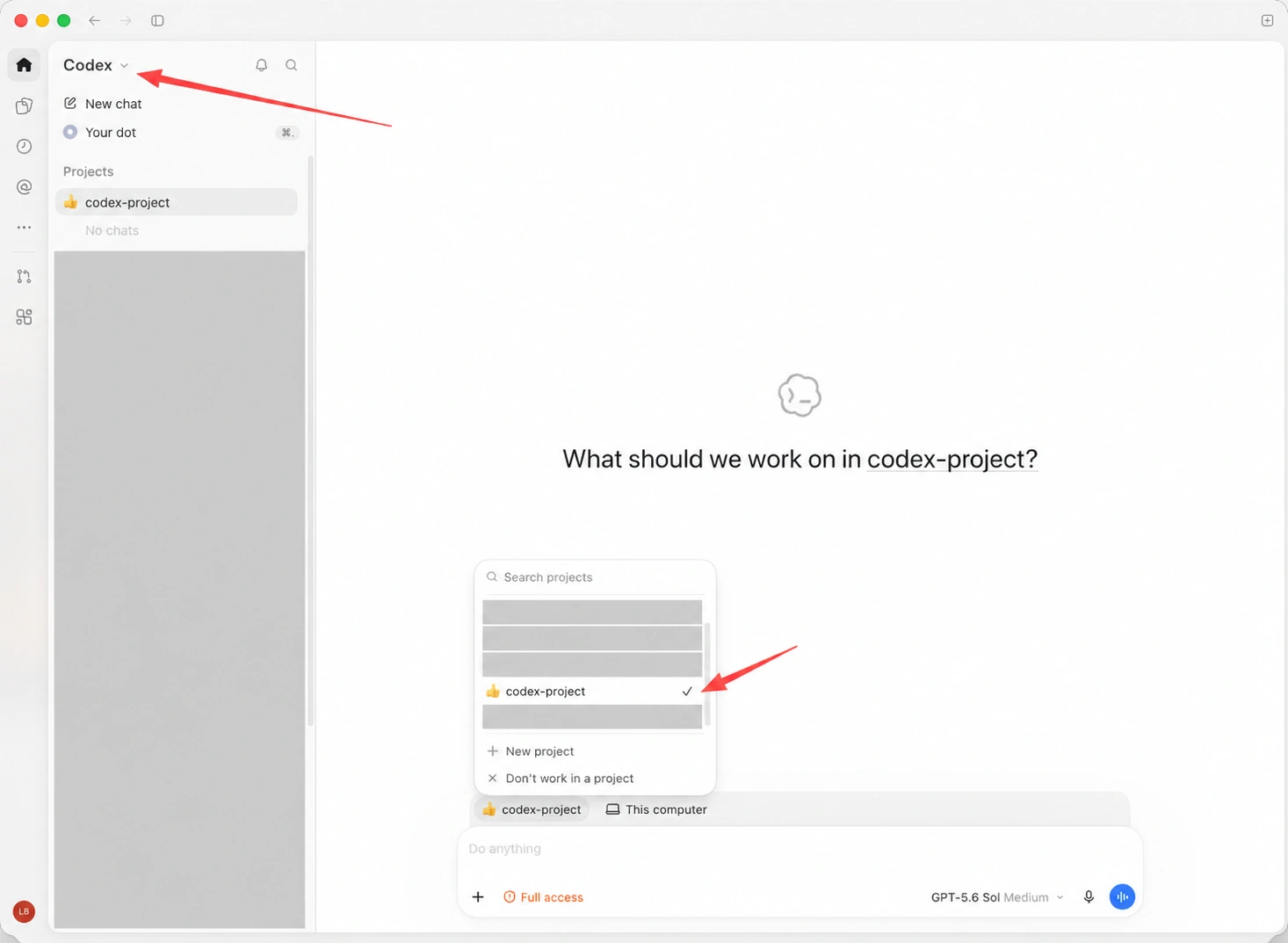
- Install and sign in to the official desktop app. Choose Codex in the product selector, then New chat. If your app has no such entry, check the official installation and feature guidance for your version.
- Create or select a project linked to a local folder. Examples:
D:\codex\company-exporton Windows or~/Documents/codex/company-exporton macOS. No particular drive is required. - Add shareable company information, specifications, buyer profiles, brand requirements and current URLs. Remove credentials, customer personal data and material you lack permission to share.
- Use the project brief below. Review the missing-information list and task plan before assigning focused chats.
- When browser work is needed, name the site and allowed actions. Sign in yourself. Review the concrete result before publishing, sending messages, spending money or changing global settings.
Source: official OpenAI desktop guide ↗. Availability and menus vary by version, OS, account and organization settings.
Follow the actual product interface
company-export/
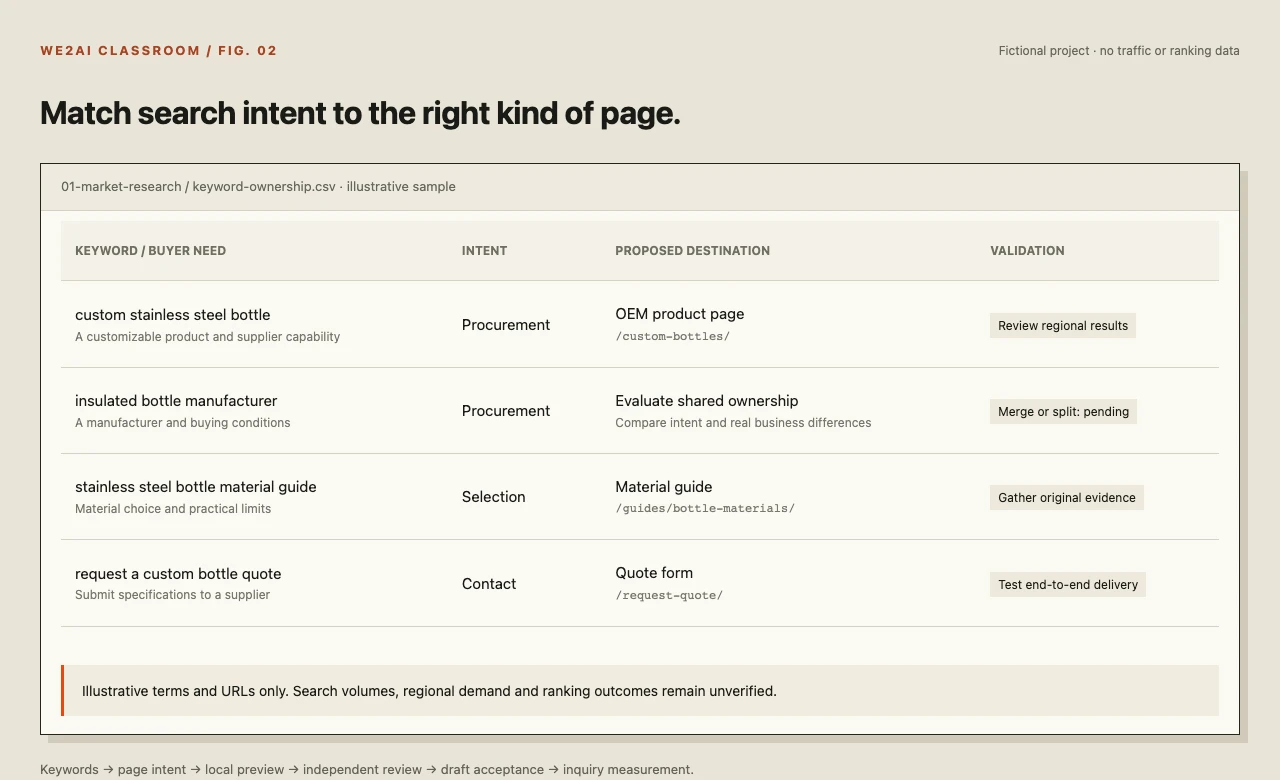
├── 00-project/     profile.md · handoff.md
├── 01-market-research/ sources · keywords.csv
├── 02-website/     page-map · local-preview
├── 03-content/     copy · images · reviews
├── 04-release/     draft-urls · screenshots
└── 05-measurement/ GSC-exports · inquiries.csv
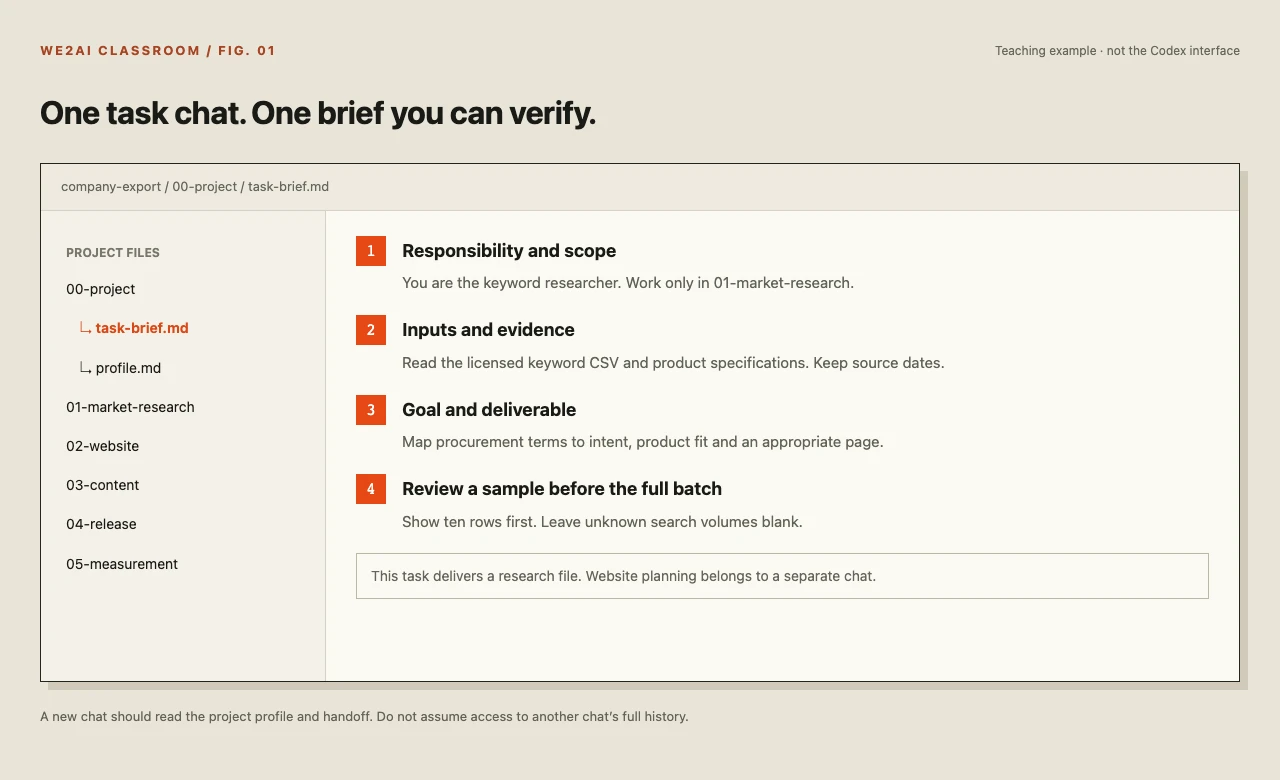
One chat, one responsibility
00 Coordinator maintains the plan; 01 Research investigates markets; 02 Writing drafts content; 03 Review checks evidence; 04 Release handles drafts and acceptance.
Share explicit file paths across chats. A new chat should read the handoff rather than assume it can access another chat’s full history.
Act as my B2B marketing project assistant. Read the company and product files and create 00-project/profile.md with the company, my role, products, markets, buyers, brand voice, working preferences, sources and unanswered questions.
This task is for organizing information only. Do not build, publish or send messages. Save outputs in this project and show the proposed directory first; do not move or overwrite existing files.
For each task state the goal, inputs, steps, deliverables and acceptance checks. Ask for missing facts; never invent market numbers, certifications or case studies. Record agreed working rules and ask each new chat to read them.
Habits that make the workflow repeatable
| Situation | Practical approach |
|---|---|
| Personal context | Keep your role, buyers, principles, style and preferences in profile.md. Review it when the business changes, or every two months. A saved profile is project context, not model training. |
| Long conversations | At a milestone or when context becomes confused, save goals, confirmed facts, files, evidence, remaining work, risks and the next step. Have the next chat read and restate the handoff. |
| Archiving | Archive inactive chats to keep the sidebar usable. Archiving is not a file backup; verify that important outputs are saved and backed up separately. |
| Separate responsibilities | Keep writing, review and coordination in focused chats with matching project/task names. Start every new chat with its scope and expected result. |
| File formats | Use Markdown for briefs, CSV/XLSX for data, HTML for pages and PNG/WebP for images. Codex is not limited to Markdown output. |
| Browser access | Grant only the sites and apps needed for the task. Routine browsing does not require enabling developer/CDP access. Use restricted permissions for onboarding; broad access needs a clear purpose and informed authorization. |
| MCP, APIs and exports | Use existing authorized connections first. Browser work or manual exports are alternatives. APIs/MCP may need setup, credentials, subscriptions and permission; a prompt does not grant access. |
| Scheduled reports | Run the process manually first. Specify timezone, reporting dates, sources and output folder. Scheduling and local runtime requirements depend on your environment; report missing data explicitly. |
| Obsidian | Use an authorized Vault as a local knowledge folder and update its index at handoff. Cross-device continuity depends on your own backup/sync configuration, not account switching. |
| Models and limits | Choose from the models currently available to your account based on capability and budget. Test a small sample first. Do not rely on old model nicknames, account switching to bypass limits, or assumed cross-account chat continuity. |
| Speed | Model choice, task size, tools, website response and network all affect time. Split large tasks into reviewable outputs and preserve errors for diagnosis. |
Update 00-project/handoff.md and the project index for a new chat that has not read this conversation. Record the goal, confirmed facts with sources, exact file paths, completed work with verification, unfinished tasks, decisions needed, failure causes and the next action. Keep assumptions separate from facts and preserve original materials.
For the next chat: read profile.md and handoff.md, verify the files exist, and restate the current status and acceptance criteria before continuing.
Finish one task before starting the next.
Each workflow includes inputs, steps, a copyable prompt and a completion check. FAQ improvement, independent review and product upload are integrated into the relevant workflows.
Showing 27 of 27 lessons
01Analyze the business modelChoose a buyer and market before investing in a website.
Steps · you supply facts, Codex executes, the owner reviews
- Ask Codex to map buyer roles, use cases, order economics and repeat purchasing. Mark missing business data as unknown.
- Research trade data, market reports and policy originals using a consistent country, year, currency and HS-code scope. Keep source URLs and dates.
- Import licensed keyword exports. Separate broad industry interest from procurement intent; search volume is not total market size.
- Compare demand, recent Chinese exports, manufacturing clusters and certification requirements. Have the business owner select one market to validate.
Act as a B2B market analyst. Work only in 01-market-research. Product: stainless steel insulated bottles. Candidate market: Germany. Buyers: brand sourcing teams and wholesalers. Read our company files first and list missing facts. Assess demand, competition, supply capability, policy and margin constraints. Cite every market figure with its year and scope. Separate facts, estimates and assumptions. Save 01-market-assessment.md and a validation checklist. Do not forecast inquiry counts.
02Select product keywordsTurn search demand into pages that answer purchasing questions.
Steps · you supply facts, Codex executes, the owner reviews
- Export competitor organic keywords from the same country database in an authorized Semrush account. If browser access is unavailable, export the CSV yourself.
- Deduplicate spelling variants. Identify procurement intent such as manufacturer, supplier, wholesale and custom; remove irrelevant brands and specifications you do not sell.
- Cluster by material, capacity, application and buyer problem. Leave unavailable search-volume fields blank.
- Manually review representative search results before assigning product or category pages. Avoid creating a separate page for every synonym.
Read the keyword CSVs in 01-market-research. We sell stainless steel insulated bottles to B2B buyers in Germany. Group phrases by purchasing intent, product fit and page type. Preserve original terms, source domain, country and export date. Do not invent search volume. Show ten sample rows for review before processing the full dataset. Save 02-product-keywords.csv and a separate list requiring manual search-result review.
03Find informational article topicsAnswer buyer questions and connect useful guides to relevant products.
Steps · you supply facts, Codex executes, the owner reviews
- Use authorized reports to collect competitor article URLs, titles, keywords, estimated traffic and export dates.
- Separate selection, comparisons, maintenance and purchasing processes. Reject popular topics unrelated to your buyers.
- Define the decision each article helps the reader make. Add your engineering experience, test evidence or practical limitations.
- Plan original evidence and useful internal links. Learn from demand patterns without copying competitor text.
Act as a B2B content planner. Read competitor page exports and 02-product-keywords.csv. Propose topics for sourcing managers with the buyer question, intent, draft title, original evidence, related product page and next action. Label competitor traffic as a third-party estimate. Do not copy their articles. Flag topics missing firsthand material. Save 03-content-topics.csv.
04Plan the website and design the UIReview working local pages before publishing.
Steps · you supply facts, Codex executes, the owner reviews
- Explain which navigation, information order or visual elements you like in reference sites. Do not copy their brand, images or wording.
- Map the homepage, products/categories, capabilities, about and contact pages. Give each page an intent, buyer question and primary action.
- Ask for a local preview and instructions to open it. Review desktop and mobile; describe feedback by location, problem and expected result.
- Check readability, specifications, forms and images before the site owner approves upload. A visual mockup alone is not a working website.
Act as our website planner and designer. Use approved brand and product files to create a bottle OEM product page. First propose the structure, then build a runnable local preview and explain how to open it. Include specifications, customization, evidence, FAQs and a Request a Quote button. Review desktop and mobile screenshots, and list missing assets. Work locally in this task.
05Write product-page copyUse verified specifications and buying conditions to earn a relevant inquiry.
Steps · you supply facts, Codex executes, the owner reviews
- Ask Codex to list facts required by each module. Do not invent minimum orders, certificates or lead times.
- Work through the first product together: value, specifications, customization, quality control, delivery and the inquiry action.
- Insert approved copy into the template and preview it locally. Keep blog article writing in a separate task.
- Have the writing chat self-check, then ask a separate review chat to compare the draft with source files. A business owner resolves disputed claims.
Write product-page copy from the current template and verified specifications. Focus on procurement decisions, retain units and limitations, and mark unsupported MOQ, lead-time, certification and numeric claims as awaiting confirmation. Deliver an English draft plus a native-language fact-check version where needed. Complete one sample before the full batch, then insert it into a local HTML preview. Include a fact-check table.
06Write helpful new articlesSolve a purchasing problem before optimizing the phrasing for search.
Steps · you supply facts, Codex executes, the owner reviews
- Select one topic and specify its reader, the decision it supports and its related product page.
- Approve an outline and evidence table first. Include test conditions, limits and real examples when available; do not write to an arbitrary word count.
- Create a natural English article and, when useful, a Chinese or other native-language checking draft. Keep terminology and units consistent.
- Use an independent review chat to check claims, repetition, citations and links before approving the preview.
Write a stainless steel bottle material guide for brand sourcing teams. Read the approved topic and verified sources. Start with an outline, then explain selection factors, use cases and limitations with traceable evidence. Do not invent tests. Provide an English publishing draft, an optional Chinese checking draft, title/description suggestions and relevant internal links. Help readers prepare a specification inquiry without keyword stuffing.
07Plan and write supporting pagesUse comparisons and application guides to support a buying decision.
Steps · you supply facts, Codex executes, the owner reviews
- Choose one product and one barrier to purchase, such as material selection, corporate gifting or a procurement checklist.
- Check whether there is enough distinct information for a separate page. Merge a simple synonym variation into the main page.
- Add comparison criteria, suitable uses, limitations and evidence, with a helpful next step.
- Review the page for standalone value. Do not mass-produce repetitive doorway pages.
Plan a customization-method guide supporting our bottle OEM page. Compare only confirmed options, such as laser engraving and screen printing, with suitability and limitations. Decide whether a separate page is justified before drafting it. Include a useful comparison table and natural internal links. Cite performance figures and avoid duplicate doorway content. Save 07-supporting-page.md.
08Upload and verify WordPress draftsUpload approved content as a draft and review it before publication.
Steps · you supply facts, Codex executes, the owner reviews
- Sign in yourself and authorize only the relevant site. Confirm the environment and backup; use staging where available.
- Have Codex inspect the editor, create a draft from the approved files and set the title, slug and descriptive image alt text.
- Preview the H1, module order, crops, buttons, language, canonical URL and indexing settings.
- Give the site owner the specific draft and screenshots to approve. After publication, recheck the form and keep a rollback copy.
Act as a WordPress upload reviewer. In the site where I have signed in, create a draft using the approved copy and images. Keep existing modules and do not change plugins, themes or global settings. Check links, mobile layout, image alt text and indexing settings. Return the draft URL and a screenshot checklist. Stop before publishing so I can approve this exact draft.
09Improve internal linksHelp buyers and crawlers reach relevant pages.
Steps · you supply facts, Codex executes, the owner reviews
- Inventory indexable product, category, article and contact pages, and verify their status.
- Ask Codex to suggest links only where context makes them useful rather than forcing keywords into every paragraph.
- Check real destinations, accurate anchors and redirect chains; exclude unpublished draft URLs.
- Apply a small approved batch first, verify it and retain a before/after record.
Review our real page inventory and copy for useful internal links along a buyer journey. Return source URL, original sentence, proposed anchor, verified target URL, reason and priority. Do not invent URLs or stuff keywords. Save 09-internal-links.csv for review before editing, then verify destinations after approved changes.
10Write SEO titles and descriptionsDescribe each page accurately in search-facing copy.
Steps · you supply facts, Codex executes, the owner reviews
- Export actual titles and descriptions by URL, identifying missing, duplicate or misleading entries.
- Write for one main intent per page, retaining meaningful specifications and differences.
- Review natural wording, brand placement and mobile presentation. Treat character counts as editorial guidance, not a ranking rule.
- Update a reviewable batch and monitor real search performance; search engines may rewrite the displayed title or snippet.
Use the page content, not just the URL, to propose an English title and meta description for each page. Address one intent, avoid unsupported pricing and certification claims, and do not repeat keywords. Save old and new values, character counts, evidence and priority to 10-metadata.csv. Do not promise an exact Google snippet or publish a bulk change without review.
11Update existing product pagesFind procurement information gaps before changing the page.
Steps · you supply facts, Codex executes, the owner reviews
- Back up the page and compare visibility, clicks, conversions and sales feedback. Separate no impressions from visits without inquiries.
- Check stale specifications, missing evidence, customization conditions and the quote path.
- Preserve useful content and effective URLs. Assess links and redirects before merging or deleting anything.
- Preview revisions locally or as a draft, then observe comparable periods after release.
Audit this product page using updated specifications, GSC and inquiry records. Separate factual errors, missing buying information, usability issues and unproven hypotheses. Prioritize by impact and effort while preserving useful content and URLs. Deliver a diagnosis and reviewable draft. Do not interpret a lack of clicks as proof of no product demand.
12Build relevant industry linksEarn useful recommendations through real industry relationships.
Steps · you supply facts, Codex executes, the owner reviews
- Find relevant associations, publications, resource pages and genuine partners that buyers would actually consult.
- Offer verifiable value such as engineering evidence, a joint case study or a helpful guide.
- Ask Codex for individual outreach drafts. A person verifies the recipient, identity and claims before sending.
- Track referral visits and qualified inquiries. Disclose paid or sponsored relationships appropriately; do not buy ranking promises.
Find relevant industry resources and editorial collaboration opportunities for our bottle OEM business. Record the source URL, relevance, material we can contribute, contact route and verification status. Draft outreach only; do not send messages without approval. Avoid paid ranking links, automated comments and bulk reciprocal links. Save 12-outreach-opportunities.csv.
13Check broken linksSeparate real failures from access restrictions and transient errors.
Steps · you supply facts, Codex executes, the owner reviews
- Limit checks to the authorized scope, start with the sitemap and use low concurrency. Avoid admin, logout and action URLs.
- Collect internal/external link status and timeouts. Treat 403, 429 and bot blocks as requiring review.
- Retest failures to distinguish redirects, temporary errors and true missing pages.
- Propose replacements, removals or justified redirects for approval, then verify the source page.
Check links within the authorized site scope. First state the expected request count and use low concurrency. Do not visit management, logout or write-action links. Record source URL, anchor, destination, status and retest evidence. Do not label 403, 429 or timeouts as broken without verification. Produce a repair list before changing anything.
14Analyze website performanceTurn traffic changes into hypotheses that can be tested.
Steps · you supply facts, Codex executes, the owner reviews
- Fix the dates, timezone, countries and devices, and compare equal-length periods with seasonality noted.
- Separate impressions, clicks, CTR, average position, landing visits and qualified inquiries.
- Segment by page, query, country and device. Check tracking changes, indexing issues and form failures.
- For each explanation, list supporting and opposing evidence, an owner and a next check.
Analyze comparable GSC, GA4 and inquiry exports. Validate dates, timezone, missing data and tracking changes first, then segment by country, device, query and page. Separate observations from causal hypotheses and explain how to disprove each hypothesis. Provide priorities, owner roles, validation metrics and follow-up dates. Do not turn correlation into causation.
15Diagnose and fix technical problemsReproduce the issue, make a small fix and verify the outcome.
Steps · you supply facts, Codex executes, the owner reviews
- Open a focused technical chat and describe expected versus actual behavior, such as an unclickable button.
- Ask for reproduction evidence and the smallest affected scope. Missing access should lead to a diagnosis rather than a guessed fix.
- Apply the minimal change locally or in staging, keeping a backup and treating complex issues separately.
- Retest the original issue, adjacent flows, mobile and desktop; review the real page after approved release.
Act as our website repair specialist. Use the supplied URL and screenshots to reproduce the issue. State expected and actual behavior, root-cause evidence and the minimal change before editing locally. Do not alter unrelated pages or upgrade dependencies. Deliver before/after screenshots, checks and rollback steps. Show production-setting changes for approval before applying them.
16Audit an older websiteInventory assets before deciding what to retain, update or merge.
Steps · you supply facts, Codex executes, the owner reviews
- Merge sitemap, CMS and analytics URLs without losing language and parameter relationships.
- Attach search metrics, inquiries, links and update dates, distinguishing missing data from measured zeros.
- Classify by business value and content quality. Review seasonal and linked pages separately.
- Update a small first batch. Business approval and redirect mapping are required before merging or retiring pages.
Build an inventory of our existing pages with URL, type, language, recent impressions/clicks, qualified inquiries, inbound links and update date. Recommend retain, update, merge or investigate with explicit evidence. Missing values are not zero. Do not delete pages automatically. Save 16-page-inventory.csv and propose a reviewable first batch.
17Create a useful calculatorGive buyers a small tool with a verifiable formula.
Steps · you supply facts, Codex executes, the owner reviews
- Choose a relevant problem such as carton-volume estimation. Define inputs, outputs, units and assumptions.
- Have a business or engineering owner approve the formula. An estimate must not masquerade as a final freight quote.
- Build the local tool with unit guidance and validation for missing and invalid inputs.
- Cross-check manual examples before linking it to products or a quote form; traffic benefits require real observation.
Create a carton-volume estimator for buyers. Confirm the formula, units, packing assumptions and valid range with me before inserting commercial defaults. Then build a runnable local page and check empty, zero, negative and unit-conversion cases. Explain estimation limits and keep final quotations separate. Deliver formula notes and manual cross-checks.
18Generate and verify imagesSeparate product evidence from AI-generated scene concepts.
Steps · you supply facts, Codex executes, the owner reviews
- Use real photography for specifications and details. AI scenes need checks against the actual product.
- Provide an authorized reference image and specify composition, preserved features and prohibited invented details.
- Inspect lids, handles, accessories, text and reflections against the real product; reject or regenerate inaccuracies.
- Export suitable dimensions and compress files. Describe the visible image in alt text and label synthetic scenes when otherwise misleading.
Use my authorized product photo as the reference for a corporate-gifting scene concept. Preserve the bottle proportions, lid and accessories. Add no branding, certification, graduations or performance claims. Include no people or text. List possible differences from the real product and label the result as an AI scene illustration. Keep specification images as real photography.
19Review Google Ads campaignsVerify conversion quality before changing spend.
Steps · you supply facts, Codex executes, the owner reviews
- Confirm the account and reporting period, then check duplicate conversions, spam leads and timezone differences.
- Connect search terms, keywords, ads, landing pages and qualified leads rather than optimizing only for cheap clicks.
- Propose small tests with few changed variables, an observation window and a spending cap.
- Have the account owner approve budget, bidding and publication changes; retain an execution log.
Read-only: analyze our Google Ads and qualified-lead exports. First check duplicate, missing and spam conversions, then segment waste and opportunity by search term and landing page. Propose a small test with a budget cap, review period and success/stop conditions. Do not raise budgets, change bids or enable/disable campaigns. Return a concrete change proposal.
20Check indexing readinessResolve indexability problems before requesting a recrawl.
Steps · you supply facts, Codex executes, the owner reviews
- Inspect each URL in the correct Search Console property, checking crawl access, noindex and canonical choices.
- Check the response, internal links and sitemap before requesting indexing.
- Use authorized individual requests for a small set and a sitemap for larger sets. Avoid repeated submissions.
- Log request dates and observe outcomes; requesting a crawl does not guarantee indexing or ranking.
Help assess these URLs on a site we manage. Check status, robots/noindex, canonical, internal links and sitemap before listing items for manual Search Console inspection. Do not promise indexing after submission or repeatedly request the same URL. Record evidence, repair steps and a follow-up date.
21Validate emerging search queriesUse new queries to guide content decisions.
Steps · you supply facts, Codex executes, the owner reviews
- Compare equal periods in the same country and note small samples and unavailable anonymous queries.
- Mark new, rising and falling queries, using third-party data only as supporting context.
- Manually check intent and fit with current product pages; prioritize questions an existing page can answer.
- Create a separate page only for a distinct need. Track later clicks and qualified inquiries rather than treating new keywords as sales.
Compare two GSC query exports with our keyword map. Identify new terms and meaningful changes, noting country, period, source and sample size. Use same-country Semrush exports as supporting estimates. Recommend updating an existing page, creating a distinct page or observing further, with reasons. Keep low-impression cases separate.
22Improve loading performanceMeasure the bottleneck and check the result.
Steps · you supply facts, Codex executes, the owner reviews
- Fix test conditions and measure more than once, separating lab diagnostics from real-user data.
- Inspect hero images, fonts, scripts, caching and third-party plugins; prioritize user impact.
- Make small local or staging changes such as image sizing or loading adjustments, with backups.
- Retest layout, navigation and forms. Real-user metrics need time to reflect a change.
Diagnose this page using repeatable baseline measurements. Record device, network, time and repeated results; distinguish lab and real-user data. Find the main bottleneck from evidence and propose a minimal local change. After each change, retest the first screen, layout, menus and forms. Do not remove essential functionality just to improve a score.
23Analyze Semrush dataTreat competitive estimates as leads to investigate.
Steps · you supply facts, Codex executes, the owner reviews
- Confirm report purpose, country database and date. Use the tool’s current report names and interfaces.
- Compare relevant competitors by topics, page types, keyword overlap and traffic concentration.
- Check brand demand, unrelated countries and unusual changes; keep estimate labels and dates.
- Validate opportunities against your products and actual GSC performance. Manual exports work without an API or MCP connection.
Analyze the Semrush files I exported. Do not buy a plan or connect unknown tools. Keep country and date consistent; compare competitor keywords, strong pages and gaps. Label third-party traffic estimates, and use GSC for our actual performance. Return five opportunities with page destinations, evidence, missing materials and next steps.
24Refresh existing articlesUpdate useful content without discarding what already works.
Steps · you supply facts, Codex executes, the owner reviews
- Check whether demand, rankings, click-through or stale content explains the problem before rewriting.
- Keep sections that answer intent. Add evidence, new questions and corrections to outdated steps.
- Check references, images, links and terminology across languages; titles must match the revised content.
- Review independently, publish the real update date and retain the previous draft and measurement plan.
Audit this article against recent queries and verified product updates. Mark useful sections, outdated sections and unsupported claims, then make the smallest valuable revision. Repair references and links. Deliver the English draft, an optional checking translation, changes, reasons and a preview. Do not change only the date to imply a substantive update.
25Make content clear for AI searchUse explicit answers and evidence that people can verify.
Steps · you supply facts, Codex executes, the owner reviews
- Answer real buyer questions directly, then add scope, units, limitations and source links.
- Use semantic HTML tables for comparisons and specifications; identify the publisher and the real review date.
- Match any structured data to visible content. Do not invent numbers to make the page appear more authoritative.
- Monitor actual referral visits and qualified leads. SEO foundations remain relevant; special AI markup does not guarantee citations.
Review this page for clarity to buyers and search systems. Use only verified materials to add direct answers, scope, clearly labeled units, useful FAQs and sources. List evidence gaps rather than inventing numbers. Structured data must reflect visible content. Return a reviewable draft without promising rankings, AI recommendations or citations.
26Decide keyword ownership and page typeChoose whether related terms belong on one page or separate pages.
Steps · you supply facts, Codex executes, the owner reviews
- Manually inspect representative results in the same country and language, recording dates, URLs and types. Avoid unauthorized automated Google scraping.
- Compare procurement versus informational intent, category versus product results and overlapping URLs.
- Prefer one strong page when it can fully meet the same need; separate distinct needs only when each has enough useful material.
- Use business context and evidence rather than a universal overlap threshold. Assign one clear primary destination per cluster.
Using the two search-result samples and product facts I provide, assess whether insulated bottle manufacturer and vacuum flask supplier belong together. Compare intent, page types, URL overlap and real business differences. List evidence and uncertainty first, then choose a primary URL and supporting terms. Request more samples when needed instead of deciding from wording alone.
27Handle routine WordPress admin tasksLimit each task to a specific, reviewable scope.
Steps · you supply facts, Codex executes, the owner reviews
- Sign in yourself and verify site, staging/production environment, role and backup. Keep credentials out of chat.
- Name the exact page or setting; have Codex read current values and show proposed changes.
- Use drafts for content. Review theme, plugin, permalink and global indexing changes individually before applying them.
- Check the real frontend, mobile, navigation and form afterward; keep previous values for rollback.
Work only on the WordPress tasks I specify. Verify the site and environment, read current values and show each proposed change with its impact. Save content as drafts. Do not change plugins, themes, roles, permalinks or site-wide indexing without item-by-item approval. Deliver before/after screenshots, frontend checks and rollback values.
Example: turn “more websites” into a testable plan.
Use Codex to launch, improve and then verify whether the site attracts inquiries.
The supplied conversation described three sites, more than a hundred ranking keywords within a month and a few inquiries. This is an unverified account without the sites, measurement definitions, costs or qualified-lead evidence. It cannot predict your results.
Only the teaching point is retained; personal names and avatars are not published. The bottle OEM project below is fictional. Keywords and URLs illustrate the method, not existing rankings or customers.
Assume a manufacturer with real specifications wants to reach German brand sourcing teams. Validate one market, one site and a small core of useful pages first. Consider additional sites only where distinct languages, markets or business needs justify them.
Clean licensed keyword and competitor-page exports. A phrase such as custom stainless steel bottle still needs regional intent validation.
Explain real specifications, customization and how to request a quote. Link a genuinely useful material-selection guide to the product.
Trace a labeled test submission through the form, notification and sales handoff before measuring actual inquiries.
| Stage | Action and owner | Deliverable / acceptance |
|---|---|---|
| Prepare | Business owner supplies approved specifications, public certification evidence, delivery constraints and buyer profile. Operations builds the workspace. | Usable source index with missing facts marked. |
| Research | Codex cleans exports; operations reviews database scope, representative search results and destinations. | Keyword file and page map with traceable sources. |
| Create | A writing chat produces copy and scene concepts; a separate chat checks evidence; the business owner confirms claims. | Natural English, accurate specifications and labeled synthetic scenes. |
| Release | Operations creates WordPress drafts; the site owner reviews mobile, buttons and the form. | Draft screenshots and a traceable test submission from entry to receipt. |
| Observe | Operations compares search, analytics, ad sources and lead records; sales qualifies inquiries. | Weekly review with enough data to expand, revise or stop rather than relying on a fixed promised timeline. |
The inquiry path needs its own acceptance check.
- Use a clear Request a Quote action. Ask only for necessary business details, such as requirements, quantity, market and contact route, with a privacy notice.
- Show a success state or thank-you page. Record a conversion after successful submission, not simply after a button click.
- Send clearly labeled
TESTdata and verify storage, email notification and sales receipt. Keep test records separate. - Track source/UTM, landing page, product, status and follow-up. Sales should define qualification consistently and exclude spam, duplicates and tests.
Act as the coordinator for our bottle OEM marketing project. Read the profile, market assessment, keyword map and verified product facts. Plan the first experiment around one target market and one site, including a product page, a selection guide and a quote path.
List evidence gaps, then deliver research, copy, local preview, draft review, form testing and post-release observation in stages. For each stage name an owner role, inputs, outputs, acceptance checks and decisions requiring my review.
Do not promise rankings, inquiries or revenue. Separate tests, duplicates, spam and qualified leads in a tracker with a consistent weekly review definition.
Key terms and common questions
What is Codex for B2B marketing?
In this guide, it means using Codex to work with authorized files, research exports, website drafts and checks. You provide business facts and approve consequential actions. The practical output is a reviewable artifact, not a promise of leads.
How do SEO and GEO differ?
SEO helps search engines discover and understand useful pages. GEO, or generative engine optimization, concerns visibility in AI-generated answers. Google says its AI search features follow the same SEO foundations and require no special AI file or schema.
Can Codex guarantee qualified inquiries?
No. Define a qualified inquiry with sales, test the form end to end and measure actual outcomes. Exclude tests, spam and duplicates. Tools can assist execution; buyer demand and business results still need evidence.
Do I need programming skills or an MCP connection?
Start with product files, authorized CSV exports and clear briefs. An MCP or API connection is optional and requires its own setup and access. For website changes, use a local preview and independent review.
Does adding FAQ content or structured data guarantee AI citations?
No. Clear answers and accurate markup help describe the page. They do not guarantee crawling, indexing, rich results or citations. Structured data must agree with what readers can see.
Check original sources and your actual environment.
This practical handbook is edited by WE2AI. It is not an official OpenAI, Google or Semrush course. Features, permissions, plans and report interfaces change; use manual exports and local files where a connection is unavailable.
- OpenAI desktop guide: installation and the ChatGPT / Codex entry points ↗
- OpenAI browser guide: browser use and developer access ↗
- OpenAI permissions: scope file, network and tool access ↗
- Google search spam policies: doorways, link manipulation and low-value scaled content ↗
- Google crawling guidance: recrawl requests and sitemaps ↗
- Google AI search guidance: AI features and your website ↗
- Google language guidance: Localized versions and hreflang ↗
Editorial owner: WE2AI. Updated 20 October 2026. Original sources support product and search guidance; the workflows and fictional example are editorial teaching material. Evaluate SEO, AI-search visibility and ads using observed data. Rankings, citations, inquiry counts and revenue are not guaranteed.